

Free member
Hands-On Lab 9-8: Configuring EtherChannel with Three Switches
Configure LACP EtherChannel links across three switches and verify port-channel operation and network connectivity.
Lab Overview
- Lab Number: 9-8
- Lab Name: Configuring EtherChannel with Three Switches
- Lab Difficulty: Rated 8/10
- Approximate Time: 60 minutes
- Preferred Image: x86_64_crb_linux_l2-adventerprisek9-ms (Layer 2/3 Switch)
- Chapter: Chapter 9 – Spanning Tree Protocol (STP)
- Figure: 9-12 (Two-Segment EtherChannels Between Switches)
Objective
- Configure EtherChannel across three switches (SW1, SW2, SW3)
- Use LACP (Link Aggregation Control Protocol) to create EtherChannels between multiple switches
- Test connectivity and verify that EtherChannel is functioning properly across all switches
Network Structure
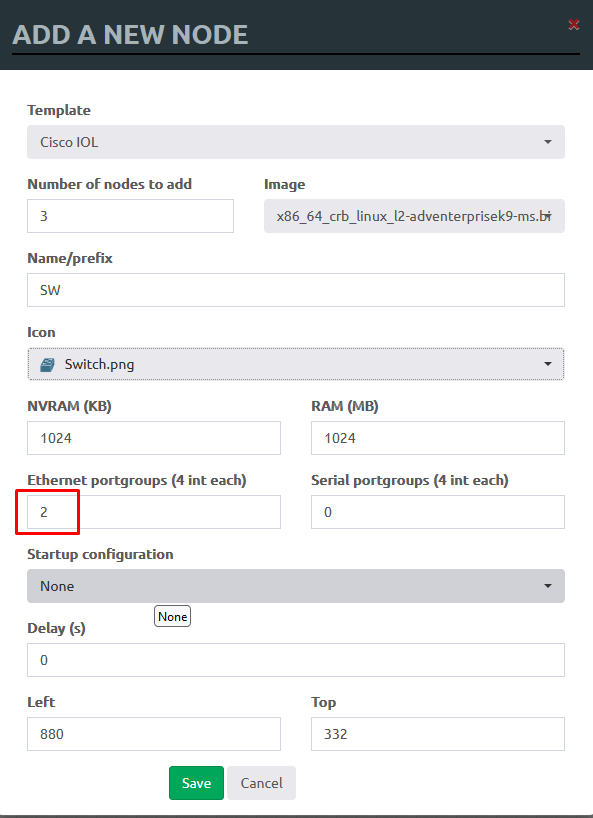
If you want to create this lab from scratch you need to add 1 more Ethernet portgroup for all switches
Devices
- Switches: SW1, SW2, SW3
- VLANs: Default VLAN (VLAN 1)
Topology
- SW1 to SW2 connected with E0/0 to E0/0 and E0/1 to E0/1 as EtherChannel links
- SW2 to SW3 connected with E0/2 to E0/2 and E0/3 to E0/3 as EtherChannel links
- SW1 to SW3 connected with E1/0 to E1/0 and E1/1 to E1/1 as EtherChannel links
