


How to turn Cisco’s official exam blueprint into a study schedule you can actually follow.
You’ve just finished another CCNP ENCOR video.
You understood the explanation. The configuration made sense. You might even have taken a few pages of notes.
But a week later, when an OSPF adjacency won’t form or traffic stops crossing a VLAN trunk, you’re not sure where to start.
It’s a frustrating situation, especially when you’ve already spent hours studying those topics.
The problem isn’t necessarily that you need another course.
It’s that watching a lesson, understanding a concept, and being able to troubleshoot it independently are three different things.
And most study schedules don’t make that distinction.
They tell you what to watch this week and what to read next week. But they rarely tell you how to decide whether you’ve actually learned something.
That’s what I wanted to address with this study planner.
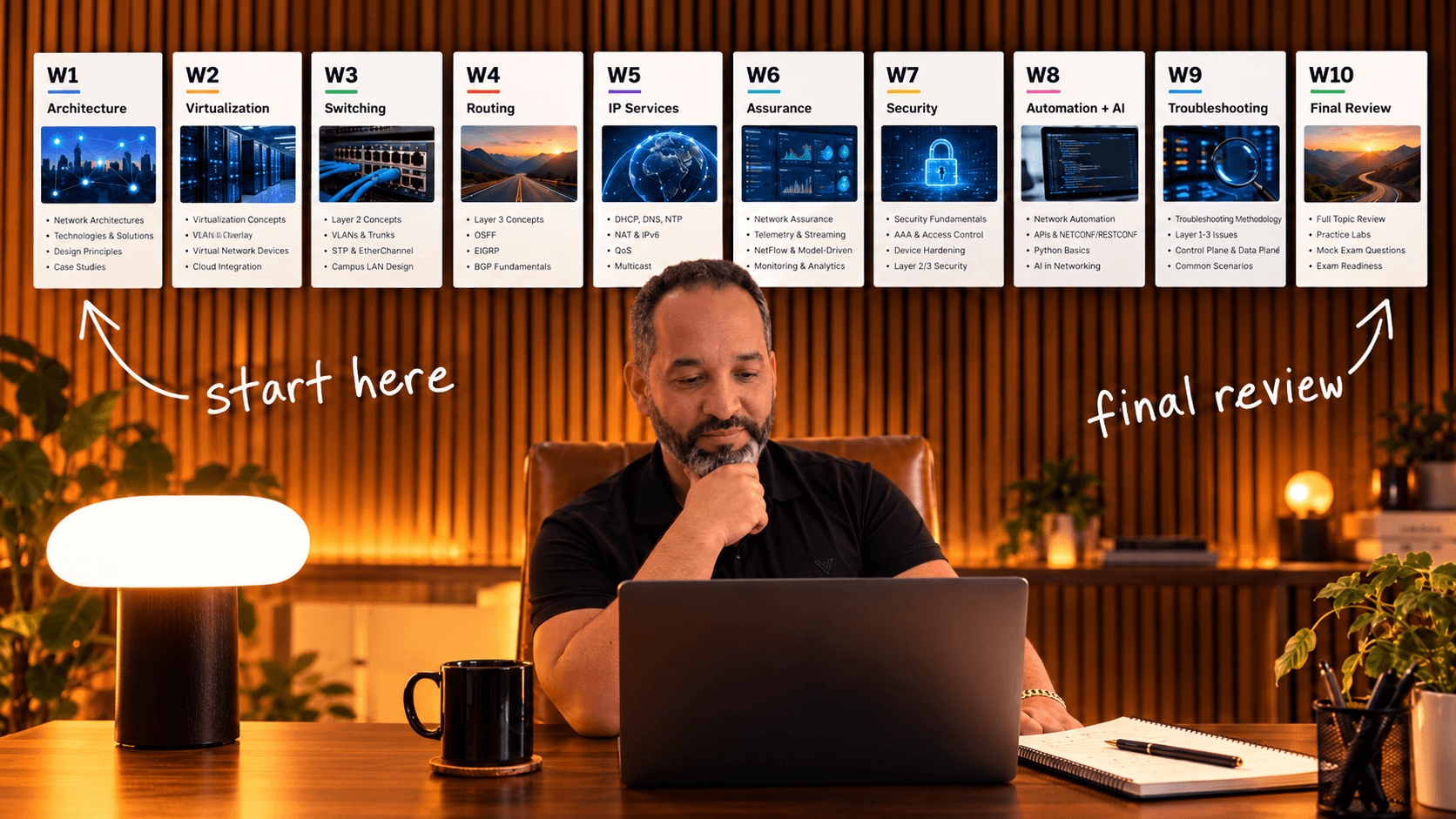
I took Cisco’s official 350-401 ENCOR v1.2 blueprint and organized it into a 10-week planning system built around three questions:
What do I need to learn?
How will I practice it?
How will I know I’m ready to move on?
Here’s how to use it.
FREE DOWNLOAD | 10-PAGE PDFCCNP ENCOR Study PlannerPrint the worksheets, build your weekly study schedule, plan your labs, and track your weak areas. You can adapt the approach for other Cisco exams, too.Download the Free PDF ↓No sign-up required
1. Frequency: Start with the hours you actually have
Before you decide what to study in Week 1, open your calendar.
Not your course playlist. Your actual calendar.
How much time can you consistently give to ENCOR preparation without disrupting everything else you’re responsible for?
If you’re working full-time, planning to study four hours every evening might look impressive on paper. But a schedule you abandon after the first week isn’t useful.
Instead, start with something you can repeat.
For example:
| Day | Activity | Time |
|---|---|---|
| Monday | Learn a new topic | 60 minutes |
| Tuesday | Hands-on lab | 90 minutes |
| Wednesday | Review and practice questions | 60 minutes |
| Thursday | Hands-on lab | 90 minutes |
| Friday | Off | |
| Saturday | Longer lab and troubleshooting session | 2 hours |
| Sunday | Review weak areas and plan next week | 60 minutes |
That’s eight hours per week.
Maybe you have twelve. Maybe you have six.
But the exact number matters less than being realistic about it. Of course, fewer hours or weaker networking fundamentals may mean you need more than ten weeks.
So give learning, practice, and review their own space.
Your first task: Fill in the weekly schedule on Page 2 of the Study Planner before assigning a single exam topic.
2. Blueprint: Know what Cisco actually expects you to do
One of the easiest ways to waste study time is to treat every ENCOR topic the same way.
Cisco’s blueprint doesn’t.
Take a look at the six exam domains:
| Cisco ENCOR v1.2 domain | Exam weight |
|---|---|
| Architecture | 15% |
| Virtualization | 10% |
| Infrastructure | 30% |
| Network Assurance | 10% |
| Security | 20% |
| Automation and Artificial Intelligence | 15% |
Source: Cisco’s official ENCOR 350-401 v1.2 exam blueprint.
Infrastructure has the largest weighting, at 30%.
But here’s something more useful than memorizing the percentages.
Pay attention to the verbs Cisco uses.
Let the exam objective guide your practice
For example, look at these three objectives from the Infrastructure section:
3.1.a: Troubleshoot static and dynamic 802.1Q trunking protocols.
3.1.b: Troubleshoot static and dynamic EtherChannels.
3.1.c: Configure and verify common Spanning Tree Protocols and specified enhancements.
Notice the difference?
Cisco isn’t simply asking you to remember what an EtherChannel is. The objective specifically says troubleshoot.
That changes how you should prepare.
Reading about LACP and PAgP is a starting point. But your preparation should also include a broken EtherChannel, the commands needed to investigate it, and enough understanding to explain why it failed.
And the same principle applies throughout the blueprint.
If an objective says describe or explain, make sure you can explain the technology clearly and understand where it’s used.
If it says interpret, practice reading configurations or output and explaining what they mean.
If it says configure and verify, you need to do more than watch someone type the commands.
And if it says troubleshoot, practice diagnosing something that doesn’t work.
Before building your schedule, go through all six domains and identify your strongest and weakest areas.
And don’t assume a domain deserves less attention just because you’ve worked with it before.
Your next task: On Page 3, rate your confidence in every domain and write down your two biggest weaknesses.
These are the topics that should influence how you spend your study hours.
3. Resources: Stop collecting courses and start using them
You can find ENCOR study material almost everywhere.
YouTube videos. Training courses. Cisco documentation. Practice exams. Network simulators. Workbooks.
But the challenge usually isn’t finding another resource.
It’s deciding which ones you’re going to use consistently.
So I’d keep the setup simple.
One primary course. Choose a course that gives you a structured explanation of the exam topics. You can supplement it with other videos when something needs a different explanation.
Cisco documentation. Use it to verify technical details and explore topics beyond an introductory lesson. The official exam blueprint should remain your reference for scope.
One lab environment. EVE-NG or Cisco Modeling Labs are both options for practicing configuration, verification, and troubleshooting.
One place to record mistakes. It could be a notebook, a document, or a spreadsheet. What matters is that you can find the information when it’s time to review.
Practice questions. Use them to discover misunderstandings and identify topics that need more work, not to memorize answers.
But you don’t need to buy five courses before you can start.
And you don’t need a dedicated lab for every single blueprint objective.
Some topics, like enterprise design principles or SD-Access architecture, require a strong conceptual understanding. Others, like OSPF configuration or EtherChannel troubleshooting, benefit directly from hands-on practice.
Instead, match your resources to what the objective asks you to do.
Your next task: Write your chosen resources on Page 4. Add a new one only when the resources you already have aren’t answering a specific question.
4. Calendar: Give each week a clear purpose
Now that you know your available hours, exam topics, and learning resources, you can build your calendar.
I prefer dividing the ten weeks into three parts.
The first eight weeks provide structured coverage of the blueprint.
Then Week 9 is for revisiting weaknesses and troubleshooting.
Week 10 is for final review and deciding whether you’re ready for the exam.
Here’s an example of how that can look:
| Week | Main focus | What to accomplish |
|---|---|---|
| 1 | Architecture | Understand enterprise design, redundancy, SD-WAN, SD-Access, and QoS interpretation |
| 2 | Virtualization | Learn virtualization concepts and practice VRF and tunneling |
| 3 | Switching | Troubleshoot trunks and EtherChannels; configure and verify STP |
| 4 | Routing | Review EIGRP/OSPF concepts, practice OSPFv2/v3 and eBGP, understand PBR |
| 5 | IP Services | Work on NAT/PAT, HSRP/VRRP, time services, and multicast concepts |
| 6 | Network Assurance | Practice troubleshooting tools, monitoring, NetFlow, IP SLA, and model-driven interfaces |
| 7 | Security | Review AAA, ACLs, CoPP, API security, and security design |
| 8 | Automation & AI | Practice Python, JSON, REST APIs, EEM, and automation concepts |
| 9 | Troubleshooting | Revisit failed labs and topics you still can’t explain |
| 10 | Final Review | Review the full blueprint, test your knowledge, and assess exam readiness |
This is the same starting sequence included in the printable Study Planner.
Adjust the schedule to your experience
Still, it’s not the only way to organize ENCOR preparation.
For example, someone who configures OSPF and BGP every day might need less time reviewing routing than someone who has mostly worked with switching.
Someone comfortable with traditional networks but new to RESTCONF may need extra automation practice.
That’s why the first two steps matter.
Your schedule should reflect both Cisco’s requirements and your own gaps.
Also, don’t wait until Week 9 to review something you struggled with in Week 3. Keep a regular weekly review session throughout the plan.
Your next task: Put actual dates beside the ten weeks on Page 5. Then reserve additional time for the weaknesses you identified earlier.
5. Labs: Practice until you can explain why something works
Let’s take a practical example.
You’re studying 802.1Q trunking.
You watch a lesson. You configure a trunk between two switches. Both interfaces come up.
So far, everything looks fine.
But have you practiced what Cisco’s blueprint actually asks you to do?
Remember, Objective 3.1.a says troubleshoot.
So let’s change the exercise.
Imagine you have two switches connected by a trunk.
VLAN 10 traffic passes between them.
VLAN 20 traffic doesn’t.
Both physical interfaces are up.
What would you check?
I’d start by examining the trunk’s operational state and the VLANs it’s carrying.
On Cisco IOS, useful commands include:
show interfaces trunkshow interfaces switchportshow vlan brief
Suppose the output shows that VLAN 20 is missing from the trunk’s allowed VLAN list.
Now you’ve found a possible cause.
Correct the configuration, verify that VLAN 20 is allowed and active across the trunk, and test connectivity again.
More importantly, explain why VLAN 10 worked while VLAN 20 didn’t.
That’s the difference between completing a configuration exercise and learning how to troubleshoot.
Use the same approach beyond trunking
You can use the same approach with other technologies.
With OSPF, don’t stop when two routers form an adjacency. Try an incorrect area ID, examine the neighbor state, and determine why the adjacency fails.
With HSRP, don’t stop after configuring an active and standby gateway. Test a failure and observe what changes.
With ACLs, verify both the traffic you intended to permit and the traffic you intended to deny.
For every hands-on topic, use this routine:
- Build: Configure the network yourself, or start from a blank prepared topology.
- Verify: Check the output and prove that the intended behavior is working.
- Break: Introduce a realistic fault when appropriate.
- Troubleshoot: Investigate the problem before looking at the solution.
- Explain: Write down what failed, why it failed, and how you verified the fix.
In other words, you don’t need to complete an arbitrary number of labs.
You need enough practice to handle the skills that the blueprint expects.
Your next task: On Page 6, write one practical skill or troubleshooting problem you want to work on each week.
6. Weak Areas: Let your mistakes decide what you study next
Here’s where a study plan becomes genuinely useful.
Imagine you’ve spent an hour on OSPF.
The configuration makes sense. Your routers form an adjacency, and the routes show up as expected.
Then you change the network type in your topology, and something stops working.
You could check the solution, fix the problem, and move on.
Or you could capture what happened and turn it into a future practice task.
I’d choose the second option.
Write down the specific problem, what evidence you observed, and what you need to investigate or practice.
For example:
Topic: OSPF neighbor adjacency
Problem: The neighbor relationship didn’t reach the expected state.
Next action: Review adjacency requirements, inspect the neighbor state, and investigate the mismatch.
Retest: Rebuild the exercise without referring to the original configuration.
That single note is more useful than writing Need to review OSPF.
It’s specific enough to act on.
At the end of each week, review the mistakes you’ve recorded.
Ask yourself which problems you can now explain without notes and which ones would still slow you down.
Then use the answers to decide what needs attention next week.
This is also why I wouldn’t follow a ten-week calendar too rigidly.
If you reach the end of Week 4 and still struggle to diagnose basic OSPF adjacency issues, moving to the next topic doesn’t make that weakness disappear.
Adjust the schedule.
Your next task: Use the weak-area log on Page 7 after your study sessions. Don’t mark an issue as resolved until you’ve successfully tested yourself again.
7. Readiness: Don’t let the calendar choose your exam date
You’ve reached Week 10.
You’ve watched the lessons, completed the reading, and spent time in your lab.
Does that mean you’re ready to book ENCOR?
Not necessarily.
After all, ten weeks is a planning window. It isn’t proof of exam readiness.
Before choosing your exam date, go back to the official blueprint.
Look at every objective.
Can you explain the conceptual topics in your own words?
Can you configure and verify the practical objectives without copying a solution?
When something breaks, can you investigate the symptoms and explain the root cause?
Have you reviewed the mistakes from your practice questions?
And can you work through unfamiliar problems rather than relying on examples you’ve already memorized?
You don’t need to feel perfect at everything.
But you should have evidence that your knowledge and practical skills cover the blueprint.
If you discover important gaps, spend another week or two addressing them.
There’s nothing wrong with adjusting the schedule.
The goal was never to reach Week 10 as quickly as possible.
It was to become better prepared for the exam.
Your final task: Complete the readiness checklist on Page 8. Then decide whether to schedule the exam or continue reviewing.
Put the entire system on paper
You don’t need a complicated application to manage all of this.
You need one place to decide when you’ll study, what you’ll study, how you’ll practice, and what needs more attention.
That’s why I created the 10-page CCNP ENCOR Study Planner.
It’s a printable worksheet that includes your weekly study schedule, the six exam domains, resource selection, a ten-week calendar, lab planning, a weak-area log, and an exam-readiness checklist.
The pages are intentionally left open for you to fill in.
Because your study plan shouldn’t look exactly like everyone else’s.
FREE DOWNLOAD | 10-PAGE PDFCCNP ENCOR Study PlannerPrint the worksheets, build your weekly study schedule, plan your labs, and track your weak areas. You can adapt the approach for other Cisco exams, too.Download the Free PDF ↓No sign-up required
Print it, fill in the first two pages, and start with the areas that need the most work.
You can follow this approach with free resources, your own lab environment, or a structured training course.
If you’d rather spend less time preparing topologies and more time practicing, CCNP ENCOR Mastery includes 45 guided hands-on labs and accompanying workbooks for EVE-NG.
But whichever resources you choose, keep one principle in mind:
Don’t measure your preparation by how much content you’ve finished. Measure it by what you can explain, configure, verify, and troubleshoot without help.
